
Storage aid types (cartons)
Storage aid types describe load carriers and packaging such as cartons or pallets, with dimensions, own weight and capacity. Each type is saved as an article marked as packaging (article attribute "pack_type"), the SKU being its article number.
Exactly these articles appear at the packing station under Choose carton (Kartonage wählen) and as Default carton (Standard-Kartonage) of a freight carrier. Without at least one storage aid type there is no carton to choose at the packing station.
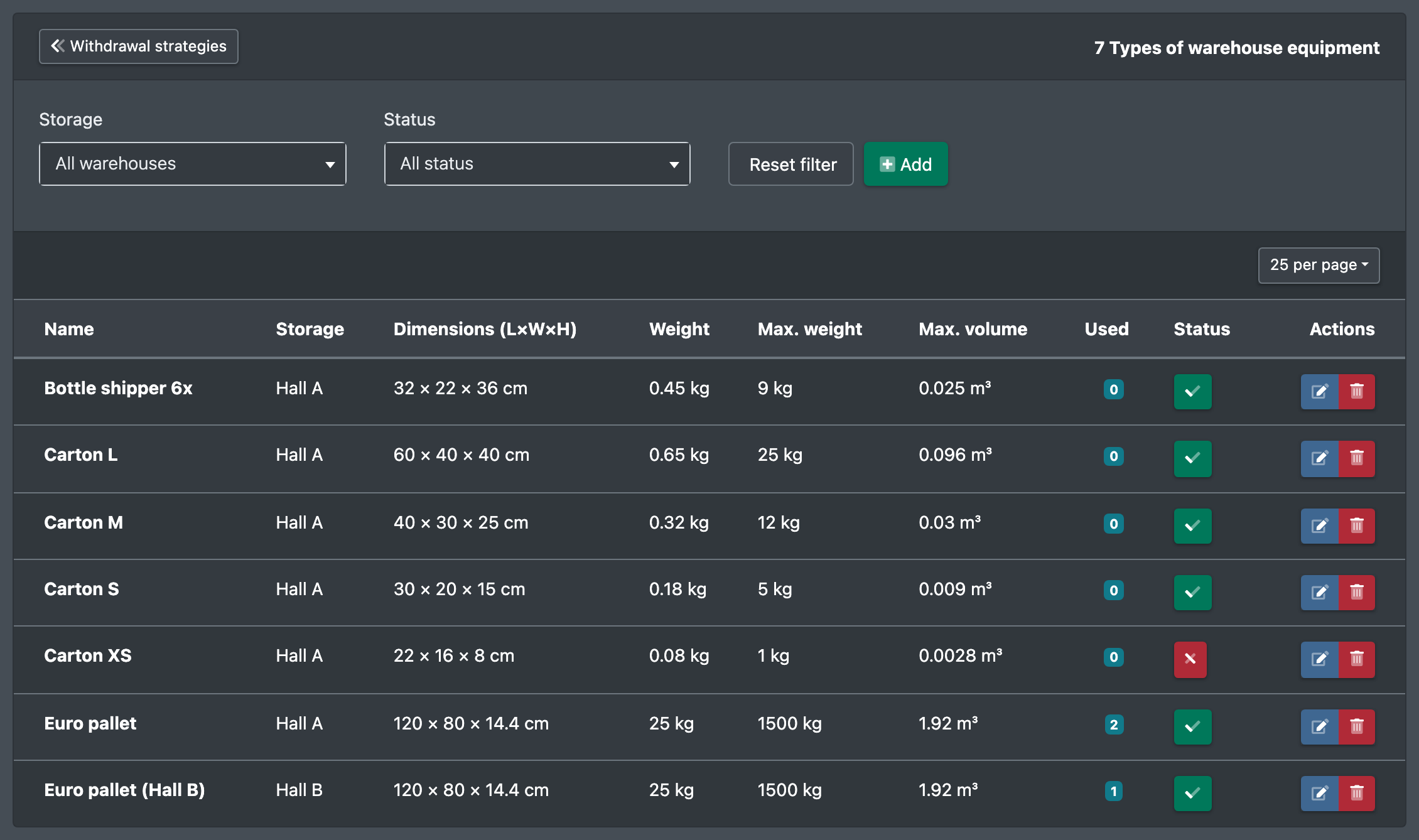
Before you start
- Your user needs the permission for Storage aids (Lagerhilfsmittel) and, to create, edit or delete, the matching permissions – ask your administrator.
Step by step
- Open WMS › Warehouse › Storage aids (WMS › Lager › Lagerhilfsmittel).
- Click Create new storage aid type (Neuen Lagerhilfsmittel-Typ anlegen).
- Enter Name (Name) and SKU (SKU). With more than one warehouse, choose the Warehouse (Lager) – or keep All warehouses (Alle Lager).
- Optional: Description (Beschreibung), Length / Width / Height (Länge / Breite / Höhe), Weight (Gewicht), Maximum weight (Maximales Gewicht) and Maximum volume (Maximales Volumen).
- Tick Active (Aktiv) and click Save (Speichern). You see "Storage aid type successfully created." (Lagerhilfsmittel-Typ erfolgreich erstellt.)
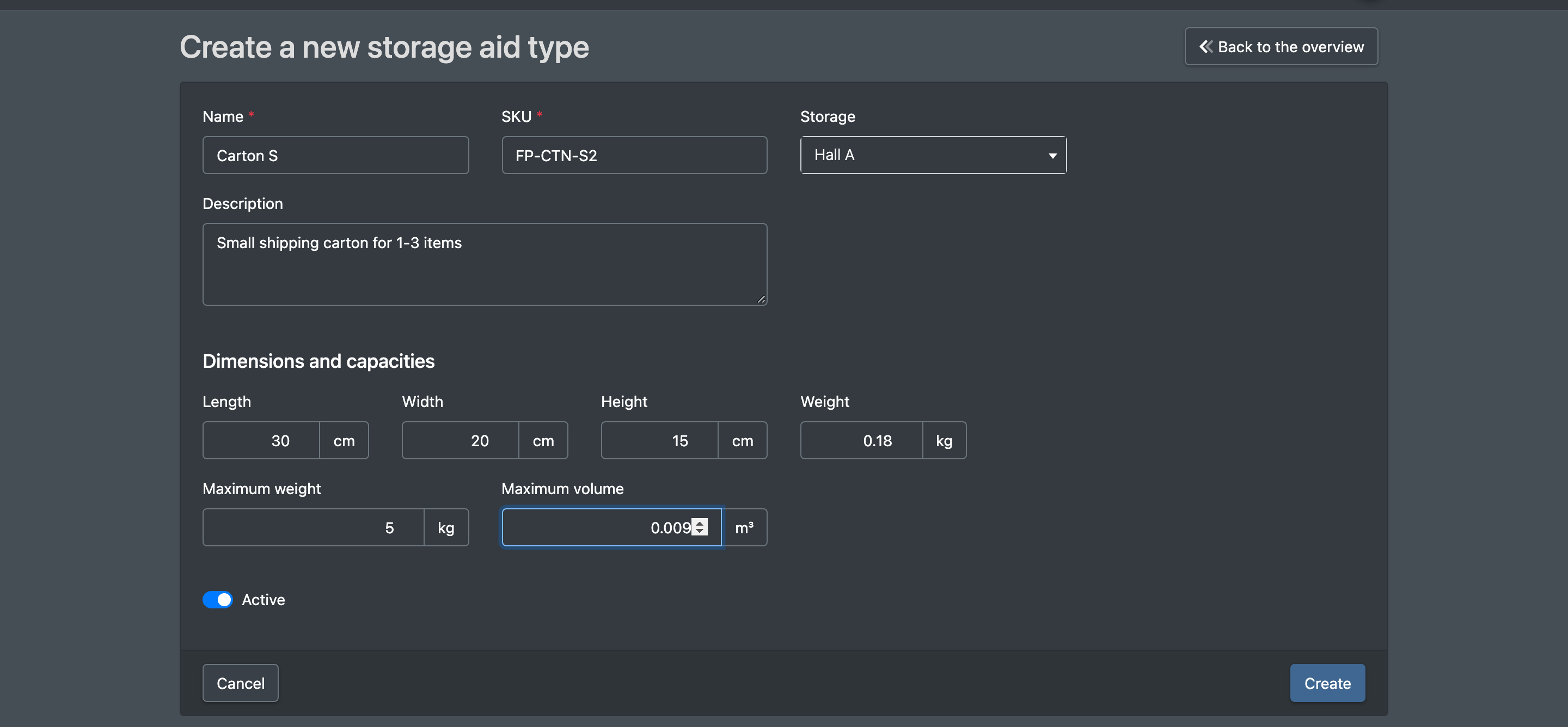
Fields and options
Create a storage aid directly in the catalogue
Every storage aid type is an article, so you can also create it like any other article in the catalogue – handy if you keep your cartons and pallets in a category of their own, e.g. "Packaging".
- Create the article in the catalogue – see Create an article. Assign it to your packaging category if you like.
- In the attribute group Warehouse (Lager), set the attribute Packaging / storage aid (Verpackung / Lagerhilfsmittel) to Yes (Ja).
- Optional: in the group Dimensions (Abmessungen) enter Length, Width, Height, Weight, Maximum weight (kg) and Maximum volume (m³), and in the group Basic Data (Grunddaten) the Warehouse (Lager; empty = all warehouses).
- Save the active article. It now appears under WMS › Warehouse › Storage aids and at the packing station under Choose carton.
The other way round, every type you create under Storage aids ends up as an article in the catalogue. If the SKU already exists there, X-Sitter does not create a second article but tells you so – then set Packaging / storage aid to Yes on the existing article.
If your catalogue has no attribute Packaging / storage aid, create it first as an attribute field with the slug pack_type (selection Yes = yes / No = no) – see Attribute fields.
Where storage aid types are used
- Packing station: selection under Choose carton – see Packing. A type whose packaging article has the attribute Is a pallet (Ist Palette, group Warehouse in the article) set to yes turns the package into a pallet: no parcel label, the order goes to loading – see Pallets at the packing table.
- Freight carriers: selection of the Default carton, which is preselected at the packing station – see Freight carriers.
- Warehouse settings: the Default storage aid (Standard-Lagerhilfsmittel) on the tab Configurations – see Warehouse settings.

Delete a storage aid type
Click the delete button and confirm the question. If the type is still used, the dialog tells you so – the assignment is removed there as well. This action cannot be undone.