
Alcohol tax ledger
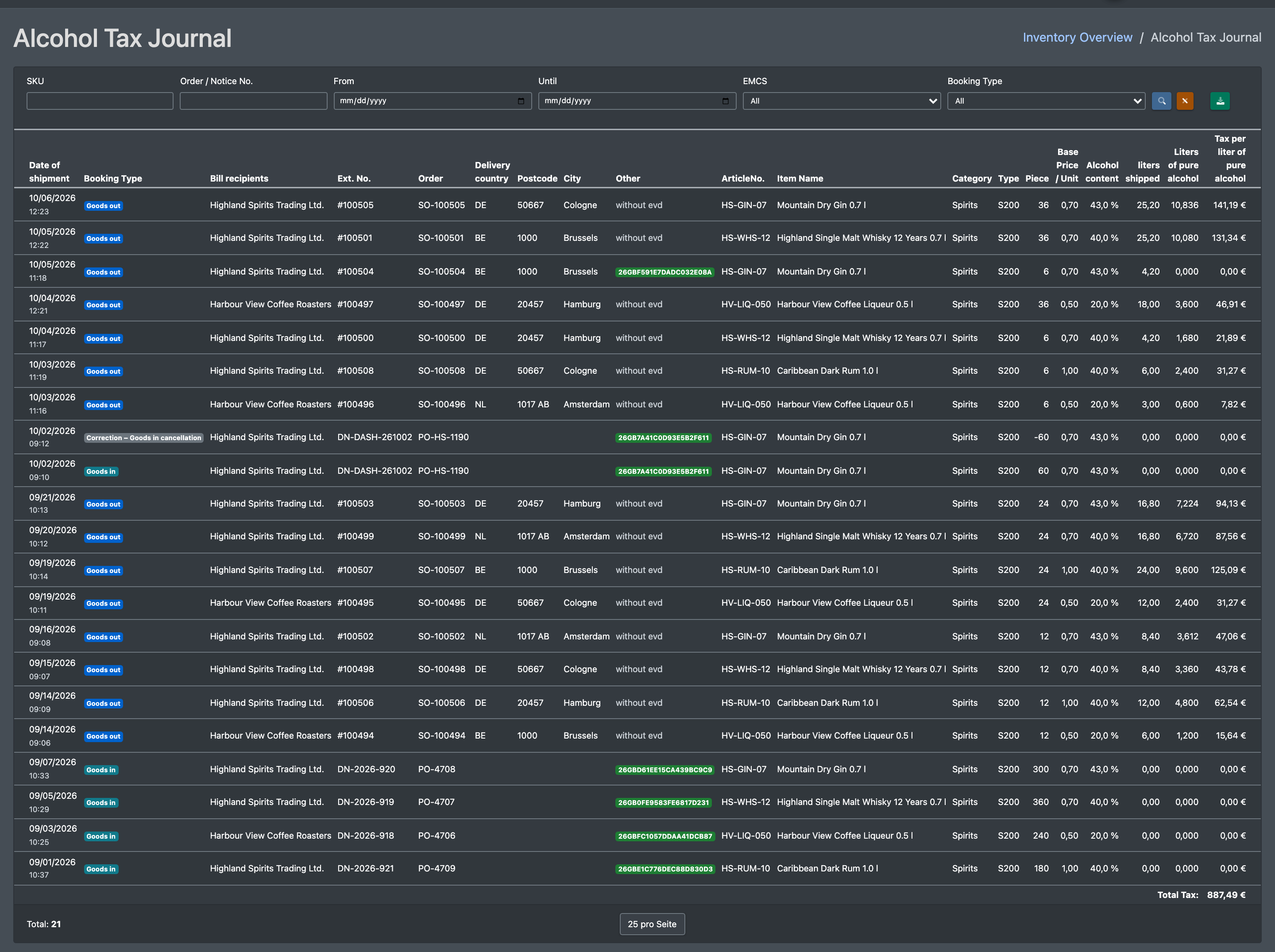
The alcohol tax ledger records incoming and outgoing alcoholic articles under tax suspension: untaxed quantities, litres, litres of pure alcohol and the calculated tax. Taxed goods are not part of the ledger – a booking that mixes taxed and untaxed units appears with its untaxed part only. It serves as proof towards customs (including the EMCS / e-AD number). You can filter it and export it as a CSV file. The entries are created automatically at putaway and when orders are shipped.
Before you start
- Your user needs the permission for Alcohol Tax Journal (Alkoholsteuer-Journal). Ask your administrator if the menu entry is missing. You only see the entries of your own company.
- The alcoholic articles are maintained in the article master, see Edit an article: alcohol content, content quantity and tax rate (for alcopops the alcopop flag and its tax rate). Optionally an excise product code from the list in the warehouse settings.
- At putaway, Taxed or Untaxed is chosen. Without this choice no ledger entry is created.
Step by step
- Open WMS › Storage › Alcohol Tax Journal (WMS › Lager › Alkoholsteuer-Journal).
- Set the filters:
- SKU
- Order / Notice No. (Auftrag / Avis-Nr.)
- From / Until (Von / Bis)
- EMCS: All, Yes or No
- Booking type (Buchungstyp): Goods Out (PICK) (Warenausgang), Goods Receipt (STORE) (Wareneingang), Returns (RETURN) (Retoure), Correction (ADJUSTMENT) (Korrektur)
- Click Search (Suchen). Reset filter (Filter zurücksetzen) clears all filters.
- Click CSV Export to download the filtered list.

Columns
At the bottom you see the totals Total Tax: (Gesamt Steuer:) and Total: (Gesamt:).
Where the entries come from
- At goods receipt, X-Sitter also updates the taxed and untaxed quantity of the article.
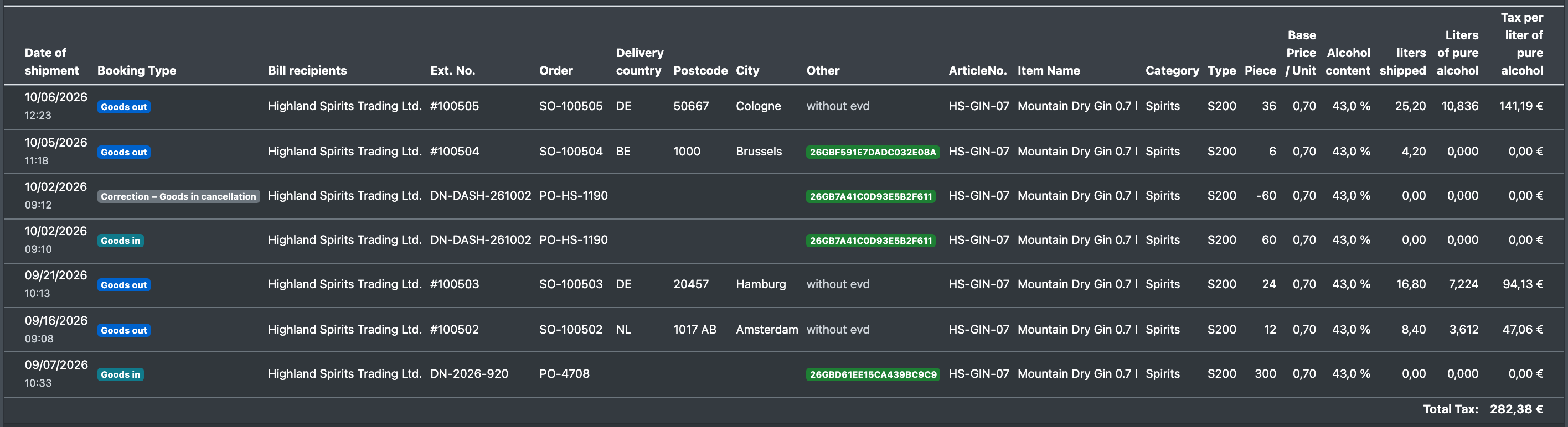
- The article history shows the tax status of every putaway, transfer, undone putaway and shipment in the note, e.g. "of which 0 taxed / 60 untaxed" (davon 0 versteuert / 60 unversteuert).
Undoing a putaway
If a pallet was put away by mistake, Undo Storage at the putaway scanner takes it back – and with it the alcohol bookings:
- The ledger gets a correction line Correction – Goods in cancellation with the reverted quantity as a negative number. It carries the delivery note number, purchase order number and EVD number of the goods receipt, so you can match both lines.
- The taxed and untaxed quantity of the article go down by the same amount.
- The article history notes the reversal as "Notification cancellation: …" (Storno Avisierung: …) with the tax status, e.g. "of which 0 taxed / 60 untaxed".
The goods receipt lines know the advance notice and the article, not the single pallet. X-Sitter therefore takes back what the ledger still holds as received for this article of this advance notice. An advance notice usually brings an article either taxed or untaxed – then the reversal is exact. If both were put away for the same article, untaxed goods are taken back first, so the ledger never keeps untaxed goods that have left the warehouse. Pallets put away without a goods receipt line (no tax status chosen) are not reverted in the ledger.

- If you enter or change the EMCS number of an order later (in the order details), the ledger lines of this order are updated.
- The EMCS column uses the EVD number of the line, for shipments otherwise the EMCS number of the order. Lines without a number are shown as "without evd" (ohne evd).