
Best-before rules
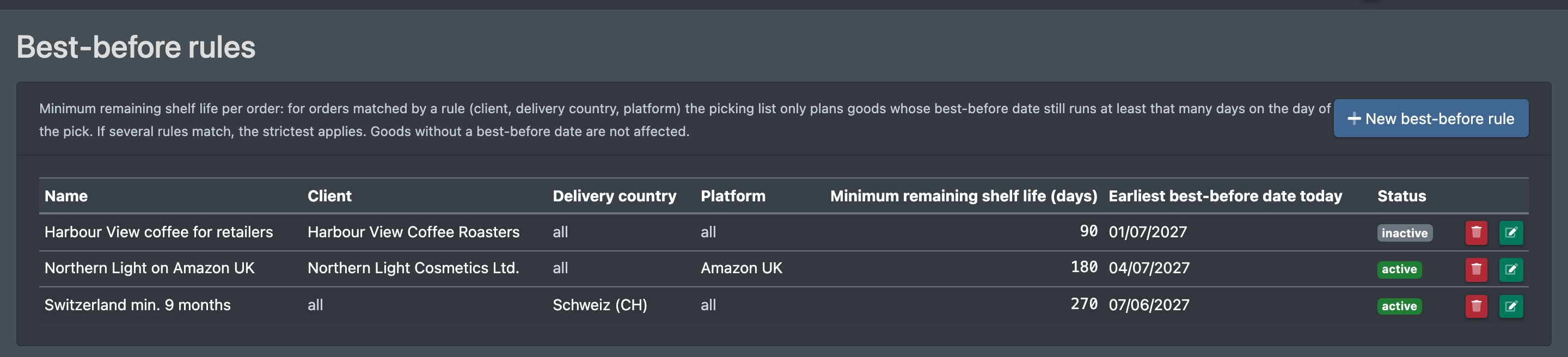
Some customers and countries only accept goods with a minimum remaining shelf life, for example nine months for deliveries to Switzerland. Under Best-before rules (MHD-Regeln) you, as the logistician, store such requirements. When a picking list is created for an order that a rule matches, X-Sitter only plans goods whose best-before date still runs at least the given number of days on the day of the pick. Goods without a best-before date are not affected.
Not the same as the warehouse setting Minimum remaining shelf life (days) (Mindestrestlaufzeit (Tage)) in the warehouse settings: that setting moves short-dated stock to blocked stock for all orders. Best-before rules block nothing – they only decide which goods may go to a particular order.
Before you start
- Your user needs the permission Best-before rules (MHD-Regeln (Mindestrestlaufzeit je Auftrag)) in the WMS area: Overview (Übersicht) to see the list, Create / Edit (Erstellen / Bearbeiten) for the form and Delete (Löschen) to remove rules. Ask your administrator.
- The rules only work for goods whose best-before date was recorded at putaway.
Step by step
- Open WMS › Settings › Best-before rules (WMS › Einstellungen › MHD-Regeln).
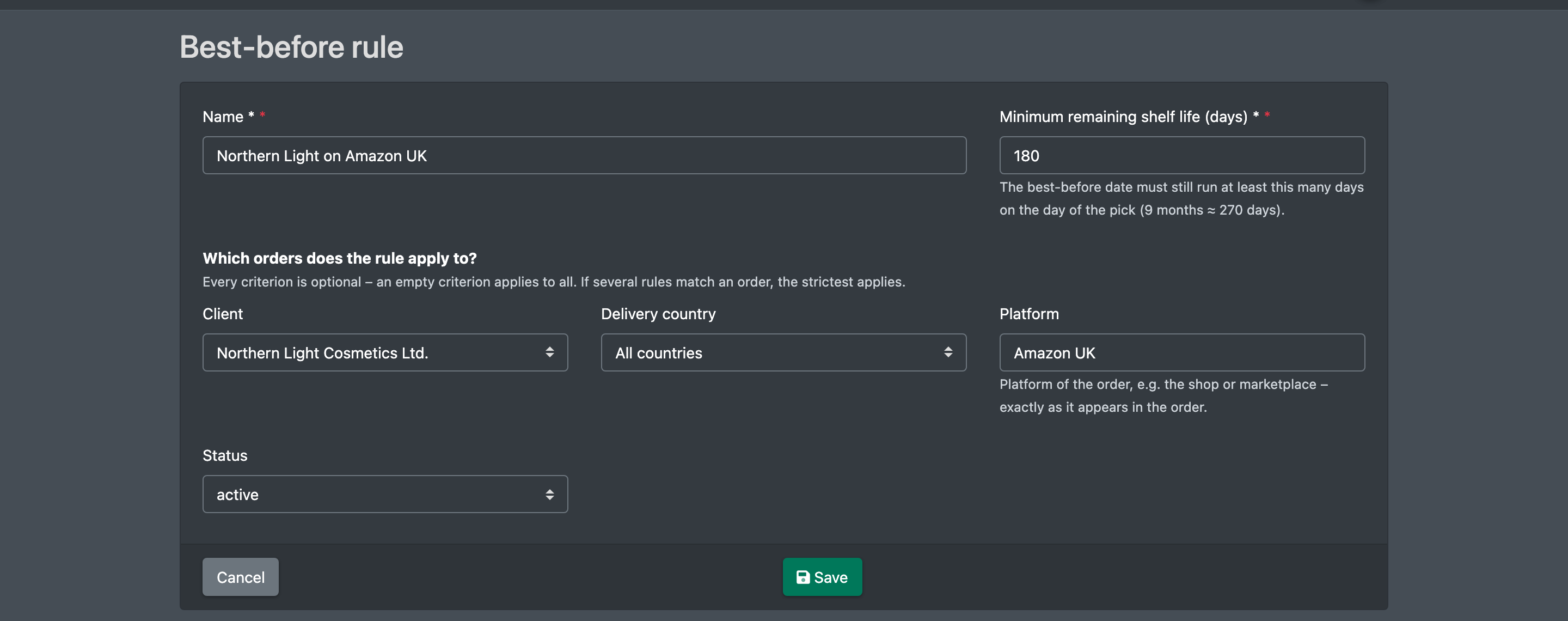
- Click New best-before rule (Neue MHD-Regel). The form Best-before rule (MHD-Regel) opens.
- Enter a Name (Name), e.g. "Switzerland min. 9 months", and the Minimum remaining shelf life (days) (Mindestrestlaufzeit (Tage)). Nine months are about 270 days.
- Under Which orders does the rule apply to? (Für welche Aufträge gilt die Regel?) narrow the rule down with Client (Mandant), Delivery country (Lieferland) and Platform (Plattform). Every criterion is optional – an empty criterion applies to all.
- Leave the Status (Status) on active (aktiv), or choose inactive (inaktiv) to prepare a rule without using it yet.
- Click Save (Speichern). You see "The best-before rule has been saved" (Die MHD-Regel wurde gespeichert) and are back in the list.
To change a rule, click the green pencil button in its row. To remove it, click the red bin button and confirm Delete best-before rule? (MHD-Regel löschen?) with Delete (Löschen). You see "The best-before rule has been deleted" (Die MHD-Regel wurde gelöscht). The buttons only appear with the matching permission.
The list
Fields and options
How the rules work
- A rule matches an order when all filled criteria match: the client of the order, the country of the delivery address (as ISO code or country name) and the platform of the order.
- If several rules match, the strictest one applies – the one with the most days.
- When the picking list is created, goods below the minimum are treated like expired goods for this order. X-Sitter takes the oldest best-before date that still meets the rule. Orders without a matching rule keep getting the oldest date as usual.
- The shortage dialog only counts goods that meet the rule. A position may therefore be short although there is enough stock with an earlier best-before date.
- The minimum is stored on each position of the picking list. During picking, the best-before date of the position shows "order requires at least …" (Auftrag verlangt mind. …), and the check is repeated on the day of the pick.
- A changed or new rule applies to picking lists created afterwards. Positions that are already planned keep their stored minimum.